
SAY
YISS
WAY
Digital Transcript Guide
📄 How to obtain your official digital transcript
SAY, YISS, and WAY alumni can obtain official digital transcripts through the Yonsei Portal. Choose the option that best fits your needs below.
Option 1: Download PDF Transcript
For personal records or to email directly to institutions
-
Log in to the Yonsei Portal.
After logging in, change the language to "ENG" at the top right corner of the page for easier navigation.Academic Information System → Grades → Exchange Student Grades -
Your transcript will be displayed. You can download it as a PDF file.
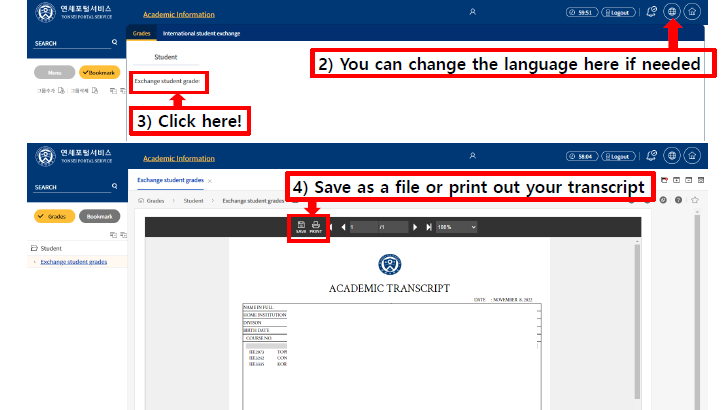 Exchange Student Grades menu location
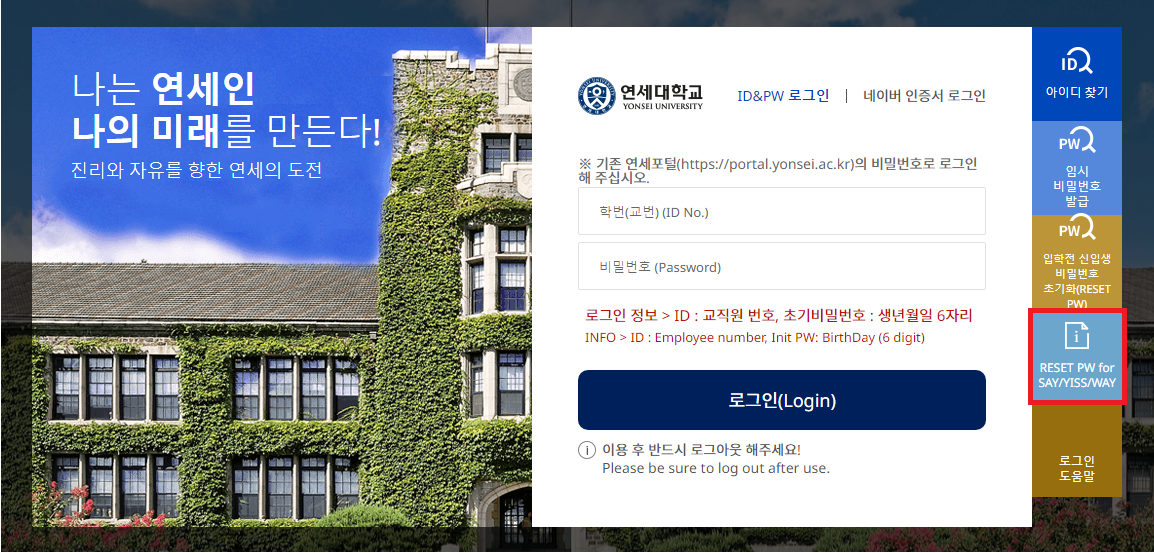
Forgot your password? Please refer to
"RESET PW for SAY/YISS/WAY"
at the Portal login page.
 Don't remember your Student ID? Please contact us at the email addresses listed below.
In your email, please include your full name, program name & year, date of birth, and home institution.
Password reset option location
In your email, please include your full name, program name & year, date of birth, and home institution.
Option 2: Send Electronic Transcript to an Institution
For official submissions requiring verified digital documents
-
Log in to the Yonsei Portal.
After logging in, change the language to "ENG" at the top right corner of the page for easier navigation.IT SERVICE → Online Transcripts & Certificates
-
If a pop-up appears requesting permission to operate the Electronic Certificate (PDF File) menu, click "허용 (Allow)", then click "Order."

-
After reviewing and agreeing to the terms, click "증명발급하기 (Issue Certificate)."

-
Select "ELECTRONIC CERTIFICATE (PDF File)."

-
Click "Order."

-
Select Degree: "Department of International Exchange" and click "Next."
⚠️ Please verify your name in English and your student ID number ("Hakbun").

-
You will be automatically redirected to the Order Box. Click "Apply," complete the required information, and finalize the payment of the issuance fee (₩3,000).
💳 If you use an overseas credit card, please select the appropriate payment option accordingly.

-
After completing the payment, go to the "Unissued" section and choose "📧 Email Transmission". Input all the necessary information and click on "Send".

-
When the transmission is completed you will see the "Successful email transmission" confirmation page.

Forgot your password? Please refer to
"RESET PW for SAY/YISS/WAY"
at the Portal login page.
Don't remember your Student ID? Please contact us at the email addresses listed below.
In your email, please include your full name, program name & year, date of birth, and home institution.
Guide to Allowing Local Network Access: [CLICK]
Don't remember your Student ID? Please contact us at the email addresses listed below.
In your email, please include your full name, program name & year, date of birth, and home institution.
Guide to Allowing Local Network Access: [CLICK]